Welcome to AgCore
What AgCore does for an Australian farm employer — workforce records, time and attendance, hiring and pay — and where the guides for each part live.
What AgCore is
AgCore is farm workforce and farm management software for Australian employers. It holds who works for you, what they did, what they're owed, and the records that have to stand up later. It runs in a browser and on the tablet in the shed.
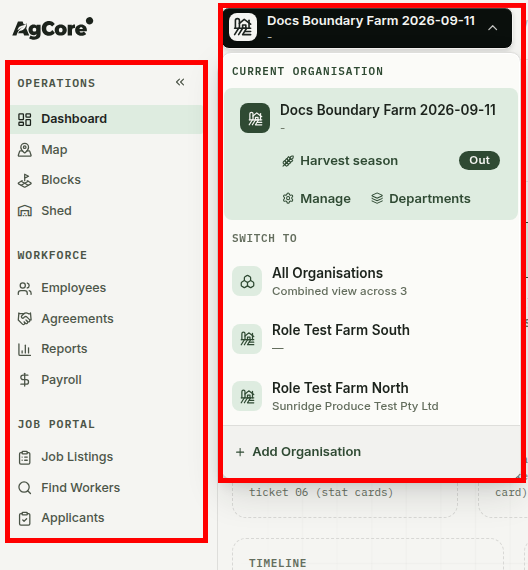
The menu splits the work three ways. Operations holds the Dashboard, Map, Blocks and Shed. Workforce keeps Employees, Agreements, Reports and Payroll together. Job Portal is where you advertise jobs, find workers and review applications.
The Organisation named in the top bar is the business you're looking at. If you run more than one entity, use this menu to switch between them or open the combined All Organisations view.
What's in these docs
The documentation is split four ways, by what you need at the time rather than by which part of the product a page belongs to.
- Getting Started — the first week. Your organisation, your people, a first pay run.
- How-To Guides — one job, start to finish. Recording hours, running a shared kiosk tablet, moving a crew between Organisations.
- Concepts — the background. What a piece rate agreement commits you to, what "small business employer" means under the Fair Work Act, how organisations, properties and departments fit together.
- Reference — the lookup pages. Every role and what it can do, every setting and what it changes, award terms defined.
Read a Concepts page when a decision doesn't sit right. Read a How-To when you already know what you want and just need the steps.
Where to start
The first week has a shape to it. Set up the business, add the people who work in it, record some hours, then take the result into payroll.
- Set up your farm organisation — the business every other record hangs off.
- Add your first farm employees — enter them yourself, or let the eForm collect their details, TFN and super fund and hand you a signed agreement.
- Your first pay run — check a complete pay run, then use the manual figures, Xero handoff or MYOB CSV.
Once you're signed in, the step-by-step guides sit in the app next to the screens they describe: recording work hours and piecework is the one most people open first.
Planned marks a version that isn't written yet. If the page name is a link, you can still open the public overview. An arrow opens the detailed guide in the app.
These docs and the ones in the app
Documentation sits in two places, on purpose.
- These public pages say what a part of AgCore does and why it works that way. Read them before you sign up for anything.
- The guides in the app at app.agcore.com.au/docs name buttons, fields and screens. They only make sense with the screen in front of you, so that's where they live.
The contents rail on the left lists both kinds. A small arrow marks a page that opens in the app. Both sides keep the same four sections in the same order.
When you're stuck
If a page doesn't answer your question, send us the question. Pages get written in the order people ask for them, so telling us what you couldn't find does more than you'd think.
For questions about the law rather than the software — what an award entitles someone to, which records you have to keep — go to the source: fairwork.gov.au. AgCore applies award rules, but it can't tell you which award covers your operation.
Open AgCore
Already have a login? Open the dashboard, or go straight to your organisations if you're setting the business up. Sign in when asked and the app carries you on to the screen you picked.
No account yet? Start a free 60-day trial — the full product, no credit card.